
How to Charge Mr Fog Switch Pod Without Battery: What Actually Works
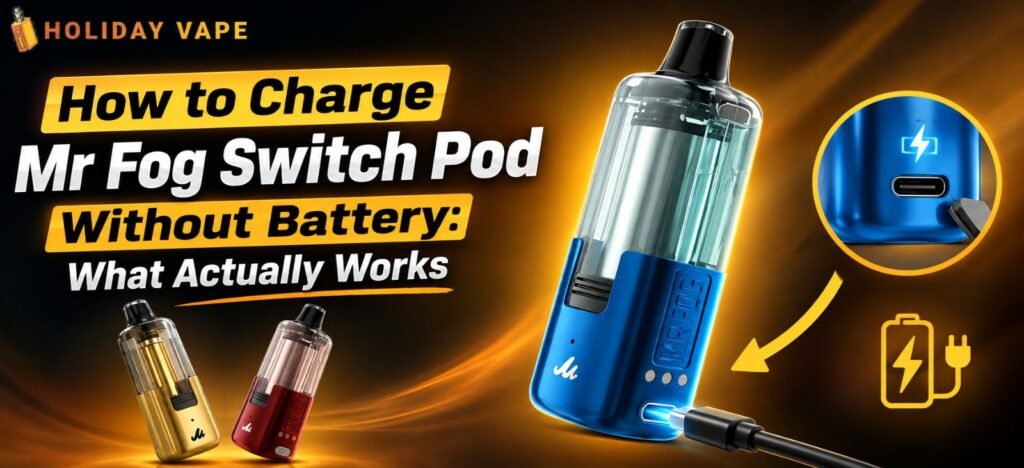
If you’ve ever misplaced the main battery base, left it behind on a trip, or just want to run your pod solo for the day, you’ve probably typed some version of “how to charge Mr Fog Switch Pod without battery” into Google. The good news: it’s actually possible, because of how the Switch Pod system is designed in the first place. The confusing part is that most people don’t realize the pod itself has its own independent power source until they actually need it.
Let’s break down exactly why this works, what to expect, and the steps to do it properly — without damaging the pod or shortening its lifespan.
Why This Even Works: Understanding the Dual-Battery System
The Switch Pod isn’t a single-battery device like most standard disposables. It’s built around two separate power sources working together, and that’s the entire reason “charging without the battery” is even a real option.
| Specification | Details |
| Max Puffs | Up to 45,000 |
| Battery Capacity | 1400mAh total system (1100mAh reusable main battery base + 300mAh built-in pod battery) |
| Nicotine Strength | 5% (50mg) |
| Charging | USB-C fast charging port |
| Tank Design | Transparent clear tank for visual e-liquid monitoring |
Notice that 300mAh figure — that’s not just a backup number, it’s an actual independent battery sitting inside the pod itself. When people say “without battery,” what they really mean is charging or using the pod without the larger 1100mAh main housing. And because the pod has its own built-in cell, that’s completely doable.
The Features That Make Solo Charging Possible
| Feature | What It Does |
| Dual-Module Versatility | Use the prefilled pod independently for portable solo vaping, or connect it to the main battery base for extended power and capacity |
| Three Power Modes | Switch between ECO (energy-saving), BOOST (balanced), and TURBO (high output) |
| Smart Memory Mode | The pod remembers your last selected power setting even when detached from the main battery |
| Custom Display Screen | Indicator lights, battery level alerts, usage animations, and adjustable screen brightness |
| Adjustable Airflow | Twist control ring at the base to fine-tune your draw preference |
Dual-Module Versatility is the key feature here. It’s built specifically so the pod can function as a standalone unit, not just an accessory that’s helpless without the main base. Combine that with Smart Memory Mode, and you get a pod that keeps your preferred power setting even after it’s been sitting disconnected for a while.
How to Actually Charge It Without the Main Battery
Here’s the step-by-step process for charging the pod using just its own built-in cell.
Step 1: Locate the USB-C port on the pod itself. Depending on the exact pod version, the charging port is either on the base of the pod or on a small connector strip near where it normally clicks into the main housing. Check both ends if you’re not sure — it’s a small port, easy to miss at a glance.
Step 2: Use a standard USB-C cable. You don’t need a special charger. Any USB-C cable connected to a wall adapter, laptop, or power bank will work, since the port uses the same fast-charging standard as the full system.
Step 3: Watch the display for charging confirmation. Once connected, the pod’s display should show a charging indicator or animation. If nothing lights up, double-check the connection before assuming there’s a hardware issue.
Step 4: Let it charge fully before disconnecting. Since the built-in cell is only 300mAh, a full charge is relatively quick compared to charging the full 1400mAh system. Avoid unplugging early just because it “feels” charged — wait for the indicator to confirm it.
Step 5: Reconnect to the main base whenever you need extended runtime. The solo charge is meant for shorter, on-the-go use. Once you’re back near your main battery housing, snapping the pod back in gives you access to the full combined capacity again.
What to Do If the Pod Won’t Charge Independently
If you’ve followed the steps above and the pod still isn’t charging on its own, here’s what’s usually going on:
- Loose or damaged USB-C connection. Try a different cable or power source before assuming the pod itself is faulty.
- Pod not fully seated when previously connected to the main base. Occasionally, a pod that wasn’t properly clicked in can develop a temporary connection issue. Reseat it fully before testing again.
- Very low or completely drained cell. In rare cases, a battery that’s been sitting unused for an extended period may need a few extra minutes plugged in before the display responds at all.
- Genuine hardware defect. If none of the above resolves it, this is where checking your retailer’s exchange policy becomes useful — a pod that won’t charge independently at all, despite a solid connection, is usually a defect issue rather than user error.
A Quick Word on Battery Care
Because the pod’s built-in cell is smaller than the main battery base, it’s worth treating it a little more carefully. Avoid letting it sit fully drained for long periods, and don’t leave it charging unattended for hours after it’s already full. These are standard good habits for any small rechargeable lithium battery, and they’ll help the pod hold its charge properly over time instead of degrading faster than it should.
Complete Flavor List
Once your pod is charged and ready to go, here’s the full flavor lineup currently available across the Switch Pod system:
- Blue Raspberry Cherry Ice
- Watermelon Bubble Gang
- Strawberry Bubble Gang
- Blue Razz Blow Pop
- Grape Popup
- California Cherry
- Peach Berry
- Peach Watermelon
- Blue Rancher Blow Pop
- Strawberry Blow Pop
- Strawberry J
- Shaking Peach
- Miami Mint
- Mint Menthol Ice
- Blueberry Raspberry Lemon
- Coffee
- Virginia Tobacco
- Pink Lemon Sour Blueberry
That’s a genuinely wide spread — candy-inspired blends, icy fruit combos, and even more traditional options like Coffee and Virginia Tobacco for anyone who prefers something less sweet.
Conclusion
The short answer to “how to charge Mr Fog Switch Pod without battery” is simple: you’re not actually charging it without a battery at all — you’re using the pod’s own independent 300mAh cell instead of the larger main housing. As long as you’re using a proper USB-C cable, giving it a full charge, and keeping an eye on the display for confirmation, solo charging works exactly as intended.
It’s one of the more practical advantages of the dual-module design — you’re never fully stuck without power, even if the main battery base isn’t with you.
Browse our full range of Mr Fog Switch Pod flavors and replacement pods online, and keep your setup ready to go wherever you are.