
How to Charge Mr Fog Switch Pod And Where to Grab a Spare
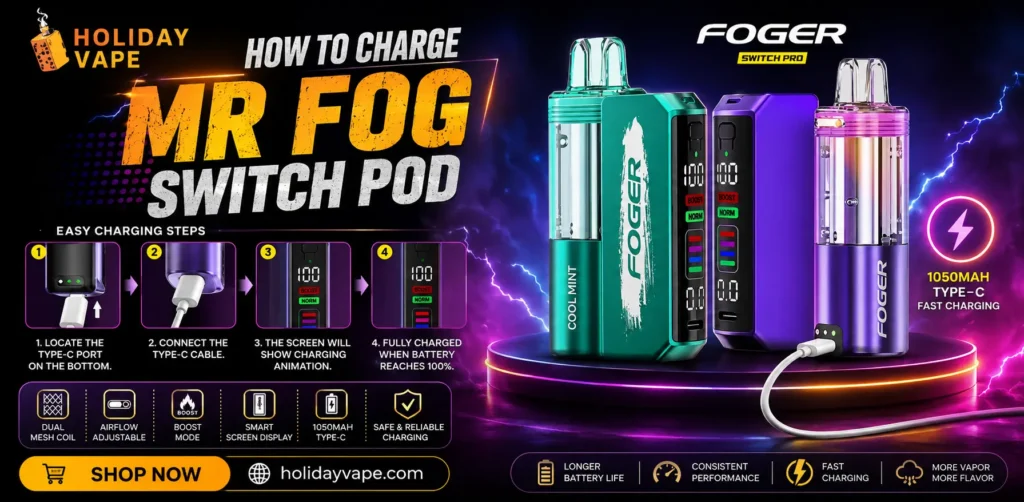
Nothing kills a good vaping session faster than a pod that won’t charge properly — or worse, running out mid-day with no backup on hand. If you’ve been Googling charging steps at 11pm hoping to fix the issue yourself, this guide covers exactly what you need. And if it turns out your pod just needs replacing altogether, we’ve got that covered too.
The Story Behind Holiday Vape
Holiday Vape didn’t start as a vape shop chasing every new release — it started because we got tired of watching customers get stuck with devices that had confusing instructions, unreliable stock, or charging issues nobody bothered to explain properly. So we built our catalog around products we could actually stand behind, with the kind of detailed guidance most retailers skip entirely. The Mr Fog Switch Pod system is a perfect example — it’s genuinely useful once you understand how it works, but the charging setup trips people up more than it should. That’s exactly the gap we’re here to fill.
Flavors Currently Ready to Ship
Before getting into the charging steps, here’s what’s currently available if you’re due for a fresh pod:
| Flavor Name | Flavor Profile |
| Watermelon Bubble Gang | Juicy watermelon with a nostalgic bubblegum twist |
| Strawberry Bubble Gang | Sweet strawberry paired with classic bubblegum sweetness |
| Blue Razz B Pop | Bold blue raspberry with a candy-pop finish |
| Grape Popup | Rich grape with a fun, candy-inspired edge |
All four are currently in stock and ready to ship — worth grabbing an extra now rather than waiting until your current pod runs dry.
Understanding the Mr Fog Switch 45000 Puffs (Pods Only) System
The Mr Fog Switch 45000 Puffs (Pods Only) setup is built differently than a standard disposable, which is exactly why charging it trips people up the first time. Instead of one fixed battery, the system uses two components working together: a standalone 300mAh pod battery, and a larger 1100mAh main battery module when the pod is attached to the full device base. Understanding this two-part structure is the key to charging it correctly.
Full Specifications
Core Specifications
| Specification | Details |
| Max Puffs | Up to 45,000 puffs |
| Nicotine Strength | 5% (50mg) |
| Pod Battery Capacity | 300mAh built-in (plus 1100mAh main battery module in the full system) |
| Tank Design | Transparent clear tank for e-liquid level monitoring |
| Operation | Draw-activated |
Features & Modes
| Feature | Details |
| Power Modes | ECO, BOOST, and TURBO |
| Smart Memory Mode | Retains your last chosen power setting even when disconnected from the main battery |
| Airflow | Adjustable bottom airflow control ring |
| Dual-Module Use | Vape standalone as a pod, or attach to the main device base for full power |
How to Charge Mr Fog Switch Pod: Step-by-Step
Here’s the correct process, whether you’re charging the standalone pod or the full system:
- Identify which component needs charging. If you’re using the pod on its own, you’ll charge just the pod’s 300mAh battery. If it’s attached to the main base, the 1100mAh module may need charging separately depending on your setup.
- Locate the charging port on the relevant component.
- Connect a compatible charging cable to a wall adapter, power bank, or computer.
- Watch the indicator light — most setups show a clear signal (usually a color change) once charging is complete.
- Disconnect once fully charged. Leaving it plugged in longer than necessary isn’t recommended for long-term battery health.
- Reattach or reconnect components as needed, and resume vaping — Smart Memory Mode will automatically restore your last power setting.
Common Charging Mistakes to Avoid
- Assuming both components charge together. In the full dual-module setup, the pod and base battery don’t always need charging at the same time — check both independently.
- Using a low-output charging cable. A weak cable will noticeably slow down charging time, even if the port connection looks fine.
- Ignoring the airflow ring during troubleshooting. If vapor output seems weak after charging, check that the airflow ring isn’t accidentally closed rather than assuming it’s a charging issue.
- Overcharging out of habit. Once the indicator shows a full charge, disconnect — leaving it plugged in “just in case” doesn’t add extra battery life.
When It’s Time to Replace, Not Just Recharge
Charging issues aren’t always about power — sometimes the pod itself has simply reached the end of its usable life. A few signs it’s time to swap in a new one rather than troubleshoot further:
- The e-liquid level in the clear tank is visibly empty despite the device still trying to fire.
- Flavor has faded noticeably even though the charge indicator shows a full battery.
- The pod won’t hold a charge at all, even after trying a different cable and power source.
If any of that sounds familiar, a Mr Fog Switch replacement pod is the simpler fix — trying to force an aging pod to keep working usually leads to a worse experience than just swapping it out.
Get Your Mr Fog Switch Pod Delivered
Ordering a replacement is straightforward:
- Pick your flavor from the current lineup — Watermelon Bubble Gang and Blue Razz B Pop have been moving quickly, so don’t wait too long if those are your favorites.
- Check current Mr Fog Switch pod restock status, since availability can shift flavor by flavor.
- Place your order through Holiday Vape for guaranteed authentic stock.
- Track your shipment — orders are processed quickly, with delivery timing depending on your location.
Frequently Asked Questions
How do I charge my Mr Fog Switch pod properly?
Connect a compatible cable to the pod (or base, depending on your setup) and a power source, then wait for the indicator light to confirm a full charge before disconnecting. Avoid leaving it plugged in longer than necessary.
Why does my Mr Fog Switch pod seem to charge slower than expected?
This is usually caused by a low-output charging cable or power source. Try a different cable first, since that’s the most common culprit.
Where can I order a Mr Fog Switch replacement pod?
You can order directly through Holiday Vape, where the current flavor lineup is kept in stock and ready to ship.
How do I know if my pod needs charging or replacing entirely?
If the pod won’t hold a charge even after trying a different cable, or if flavor has faded despite a full charge, it’s likely time to replace the pod rather than continue troubleshooting the battery.
Can I use the pod without charging the main battery base?
Yes, the pod has its own standalone 300mAh battery and can be used independently without the base attached.
What does Smart Memory Mode do?
It automatically saves your last selected power mode (ECO, BOOST, or TURBO), so you don’t have to reselect it every time you reconnect the pod after charging.
Is there a current deal on Mr Fog Switch pods?
Pricing and promotions shift with each restock, so it’s worth checking for any active Mr Fog Switch pod deal before placing your order, especially if you’re buying more than one.
Conclusion
Charging the Mr Fog Switch Pod correctly comes down to understanding its two-part battery system and giving it the right cable and connection — once you’ve got that down, it’s a quick, painless part of your routine. And if your current pod is past the point of a simple recharge, don’t wait until you’re completely out.
Claim your Mr Fog Switch pod through Holiday Vape today — with flavors like Grape Popup and Strawberry Bubble Gang ready to ship, you won’t be without a spare for long.